
ConnectQR is in the Canva Apps Marketplace. Create dynamic QR codes with real-time analytics and drop them straight into your Canva designs - posters, flyers, packaging, social media, and more.
Free to install
No account required to start
Dynamic codes with analytics
Monthly active Canva users with access to ConnectQR
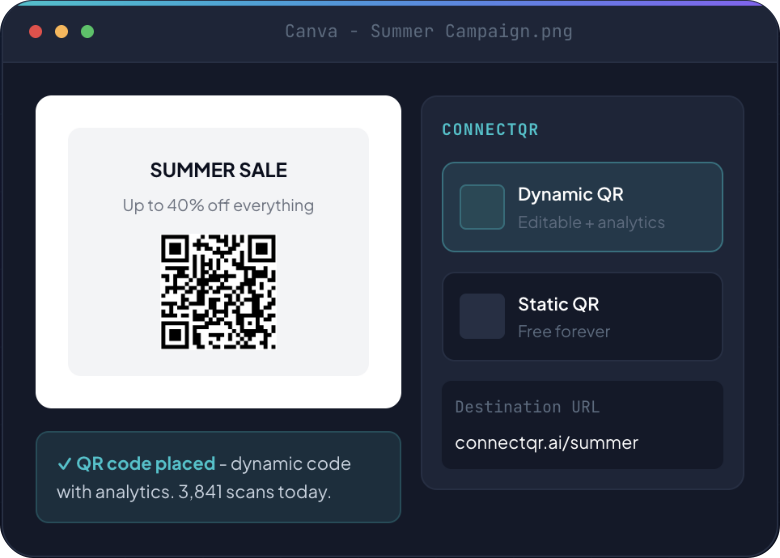
From Canva design to live QR code with analytics
To install from the Canva Apps
Marketplace
Switching between tools - everything stays in Canva
No switching tabs. No exporting and reimporting. ConnectQR lives inside Canva
and your QR code drops straight into your design.
Open ConnectQR in Canva
Find ConnectQR in the Canva Apps panel to create QR code in Canva without leaving your design. Search "ConnectQR" or find it under the QR code section. Install is instant - no credit card.
Choose static or dynamic
When you make a QR code in Canva with ConnectQR, pick static or dynamic. Static codes are free forever. Dynamic codes track every scan with real-time analytics and let you update the destination without reprinting.
Customise your design
Match the QR code to your design colours and add your logo. AI generates a branded code that fits your Canva design instantly.
Drop into your design
Click to place the QR code anywhere in your Canva canvas. Resize, reposition, and export as normal. Done.
Canva has a basic built-in QR tool. ConnectQR gives Canva users access to the
full professional QR platform - analytics, editable codes, GS1 Digital Link, and more.
Real-time scan analytics
Every dynamic QR code tracks total scans, unique visitors, geographic data, device breakdown, and time patterns. Know exactly how your Canva designs are performing in the real world.
Update the destination without reprinting
Printed a flyer last month with a QR code that now points to the wrong URL? Change it in your ConnectQR dashboard. Every existing printed code updates instantly. No reprint required.
AI-generated branded designs
Upload your logo and brand colours. ConnectQR AI generates a custom QR design that matches your Canva aesthetic - not a generic black-and-white square dropped onto your design.
Google and Meta integration
Connect Google Analytics and Meta Pixel to your QR codes. Every scan from a Canva-designed piece of print media becomes a trackable event in your existing marketing analytics stack.
Canva's built-in QR generator is fine for a one-time static code. ConnectQR is
the right choice for anyone who wants to track performance, update
destinations, or run campaigns from their printed designs.

Canva includes a basic built-in QR tool that creates static codes. For anything beyond that, ConnectQR in the Canva Apps Marketplace is the qr code generator canva teams rely on for dynamic codes, scan analytics, branded designs, and editable destinations, all without leaving your design.
Open the Canva Apps panel, search "ConnectQR", and install it - it's instant and free. Then create a QR code in Canva by entering your destination link, choosing static or dynamic, and clicking to place the code in your design. Resize and export as normal.
Yes - that's the main reason to use ConnectQR over the built-in tool. A dynamic QR code in Canva can have its destination changed after your design is printed, and every scan is tracked with real-time analytics: total scans, locations, devices, and time patterns.
Installing ConnectQR from the Canva Apps Marketplace is free, and static codes are free forever. The free plan also includes 2 dynamic QR codes with analytics and editable destinations, so you can try dynamic codes on a real campaign before upgrading for more.
Absolutely - print is where it shines. Generate QR codes in Canva for posters, flyers, packaging, menus, and business cards, matched to your brand colours. Because dynamic codes are editable, a printed piece never goes out of date even if the link changes.
Start with free static codes. Upgrade to dynamic codes with
analytics when you need to track performance and update destinations.